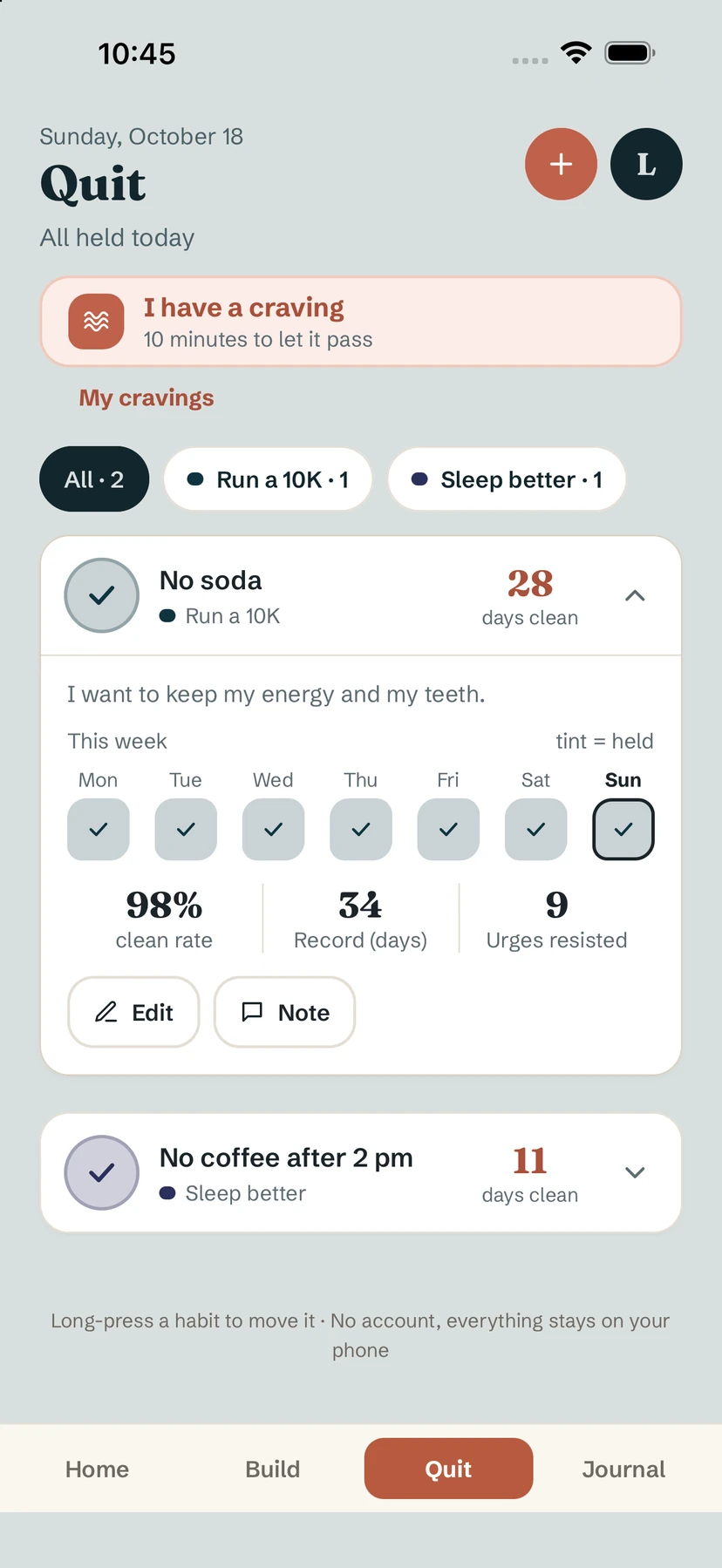
The Quit tab counts the other way round: every day counts as held unless you say otherwise. There is nothing to tick on a good day.
Add a habit to quit
- Open Quit and tap +.
- Name it (for example "No soda"), pick an icon and a goal if you like.
- In the editor, fill in Why you quit. Yolmira shows this reason on the craving screen.
If you slip
Tap the circle next to the habit: today's relapse is noted, without judgement. Undo is offered for a few seconds if you tapped by mistake. Your record stays yours: a relapse resets the current count, not what you built.
What the card shows
- the days clean, on the right of the card;
- This week, where a tinted day means held;
- clean rate, Record (days) and Urges resisted when you open the card.
Freedom milestones
Yolmira celebrates 7, 30 and 100 days clean, then six months and a year. A short card marks the moment; tap Keep going to carry on.
When the urge comes
At the top of Quit, I have a craving opens a calm ten-minute screen to let it pass. See the craving tool.
Tip. Changing the cue usually works better than willpower. Read how to break a bad habit.
Common questions
Do I have to tick anything on a good day?
No. On the Quit tab, every day counts as held unless you note a relapse.
What if I tapped relapse by mistake?
Tap Undo, offered for a few seconds. You can also fix a past day in the habit's calendar.
Does a relapse erase my record?
No. It resets the current count of days clean, but your record stays.
Still stuck? Write to us at yolmira-help@outlook.com — a person reads every message.