Life happens after the fact. Yolmira lets you correct your record at any time, without penalty.
A day this week
- Tap the arrow on the habit's card to open it.
- Under This week, tap the day to check or uncheck it.
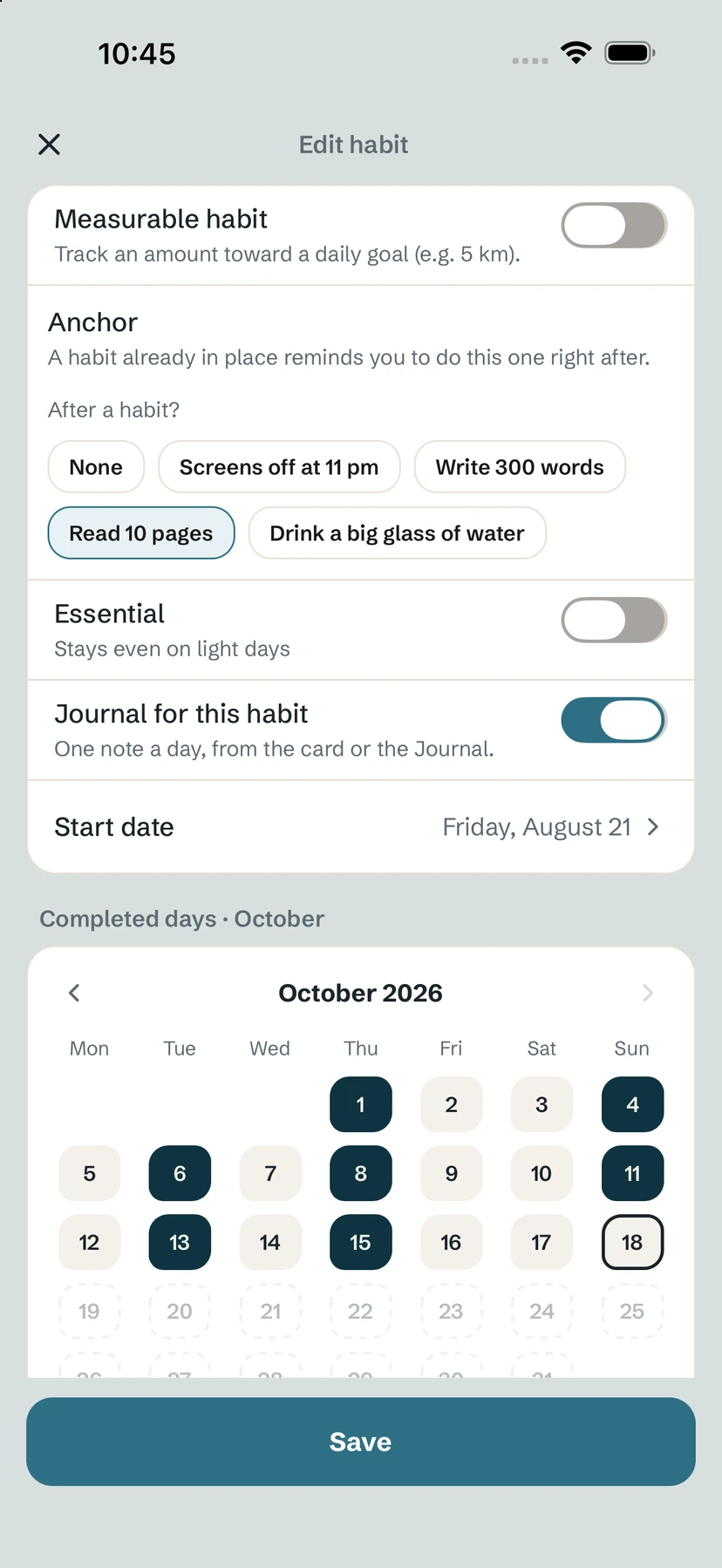
An older day
- Open the habit's editor with Edit.
- Scroll to the Completed days calendar and move between months with the arrows.
- Tap a day to mark it done or undone. For a habit to quit, tap a day you relapsed.
- Save.
Started earlier?
If you tap a day before the habit's start, Yolmira asks Started earlier? and offers to Set start date. You can also change the Start date directly in the editor.
Tip. Fixing a forgotten tick restores your streak and the goal's stone for that day. For a day you genuinely missed, see streak repair.
Common questions
Can I check off yesterday?
Yes. Open the card and tap the day under This week, or use the calendar in the editor.
Does fixing a past day restore my streak?
Yes. Streaks, rates and goal stones are recalculated from your corrected record.
Can I record a relapse on a past day?
Yes. For a habit to quit, tap that day in the editor's calendar.
Still stuck? Write to us at yolmira-help@outlook.com — a person reads every message.