A number tells you that you ran; a note tells you how it went. Each habit can carry one short note per day.
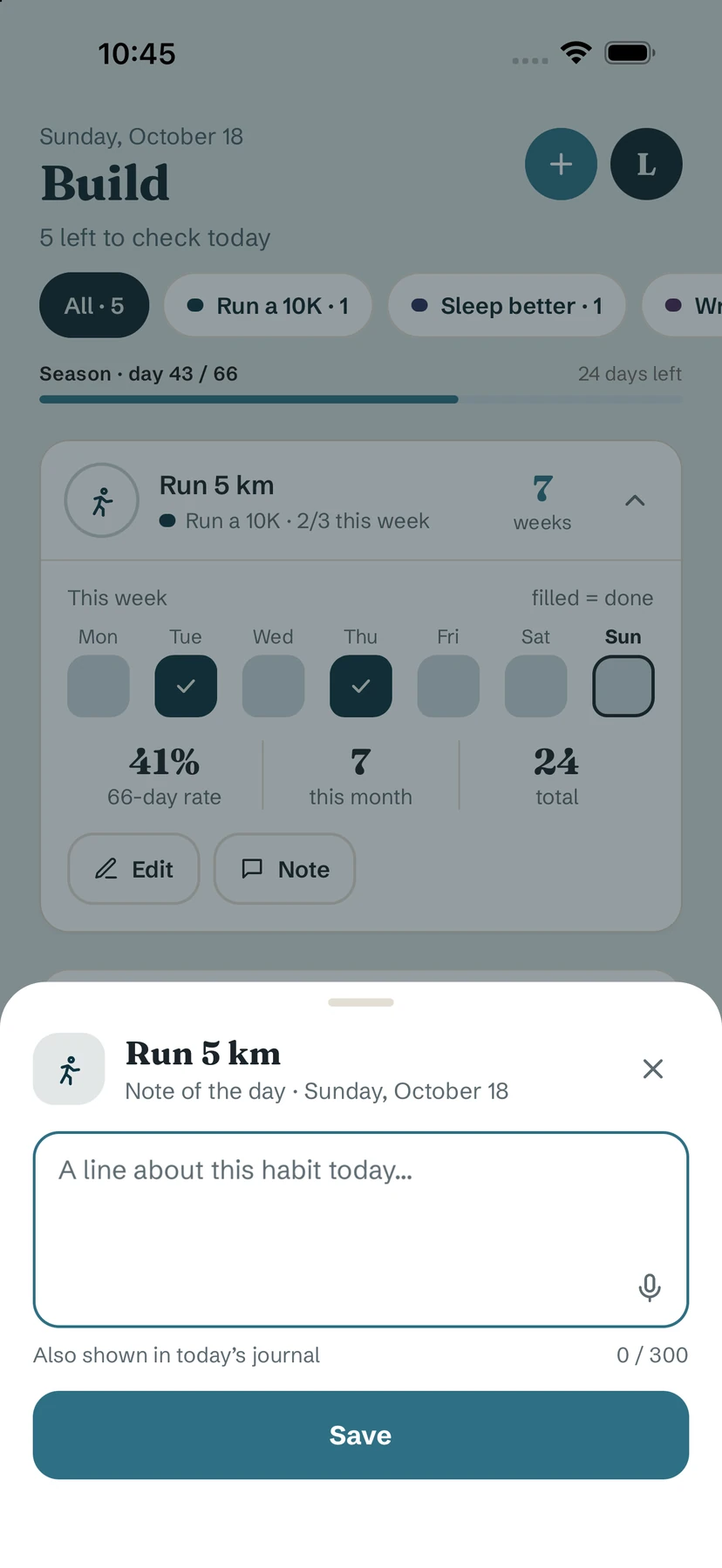
Add a note
- On Build or Quit, open a habit's card with the arrow and tap Note — or, in the Journal, tap + Note next to the habit under Your day.
- Write a line ("A line about this habit today…"), up to 300 characters.
- Tap Save.
Where your notes appear
- In today's journal — the note sheet says it: "Also shown in today's journal".
- In Earlier days, under each day's entry, so you can reread a whole day at once.
- Per habit, to follow one habit over time.
Turn notes off for a habit
Open the habit's editor and switch off Journal for this habit. The habit no longer shows in the journal and its note button disappears. Your existing notes are kept, just hidden — turn it back on to see them again.
Tip. On a habit you're quitting, a note after a craving ("Tea instead. It passes.") is often more useful later than any statistic.
Free / Pro. Notes are free.
Common questions
How long can a note be?
Up to 300 characters — two or three lines.
Can I add several notes a day to one habit?
One note per habit per day. You can edit it during the day.
Are my notes deleted if I turn off Journal for this habit?
No. They are kept and hidden; turn the option back on to see them.
Still stuck? Write to us at yolmira-help@outlook.com — a person reads every message.